


Lifestyle

Share
Published 08:55 7 Oct 2015 BST
Updated 09:36 8 Sept 2016 BST
Explore more on these topics:
 When your battery is on its last legs, most users will close down any active apps by double clicking the home button and swiping up. It's the normal protocol and it seems like it makes perfect sense to close as many apps as possible if you want to save some power.
Apparently, though, there's another method that preserves the battery in your phone for even longer - and you can use it even before your battery gets to critical level.
When your battery is on its last legs, most users will close down any active apps by double clicking the home button and swiping up. It's the normal protocol and it seems like it makes perfect sense to close as many apps as possible if you want to save some power.
Apparently, though, there's another method that preserves the battery in your phone for even longer - and you can use it even before your battery gets to critical level.
 The experts/geeks say that this 'swiping up' method doesn't actually save your battery because the act of opening these apps up again ultimately drains more energy.
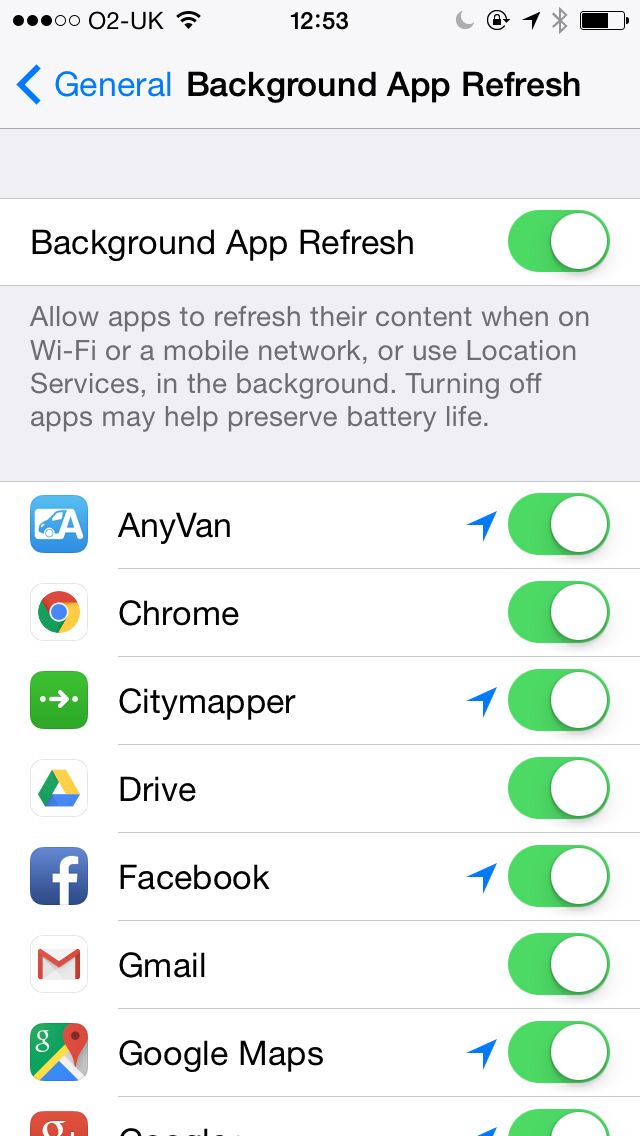
Instead, the best practice is to go into settings, then select general and tap on background app refresh to see the list of apps that are running in the background and draining your battery.
You can then switch the setting off entirely to save power, or switch off individual apps that you find particularly troublesome.
The experts/geeks say that this 'swiping up' method doesn't actually save your battery because the act of opening these apps up again ultimately drains more energy.
Instead, the best practice is to go into settings, then select general and tap on background app refresh to see the list of apps that are running in the background and draining your battery.
You can then switch the setting off entirely to save power, or switch off individual apps that you find particularly troublesome.
 It's not going to turn your iPhone's battery into a self-sustaining nuclear reactor or anything, but it should buy you a little more time to keep going.
Read more:
It's not going to turn your iPhone's battery into a self-sustaining nuclear reactor or anything, but it should buy you a little more time to keep going.
Read more:


Lifestyle


Lifestyle

Lifestyle
Shoppers praise budget-friendly fire pit that’s ‘cheaper than B&M’
‘Simply brilliant’ Shoppers are praising this budget-friendly fire pit that will elevate your garden this summer. With the weather set to improve this weekend you might be on the look out for some outdoor essentials, including a fire pit as the temperature cools in the evening. Although installing a fire pit in your garden can […]
Lifestyle
17h
Amazon beats Shark price as ‘fantastic’ cordless vacuum slashed by 49%
‘Fantastic piece of kit for the money’ A ‘must-have’ vacuum cleaner for pet owners has been slashed by half price for a limited time. The Shark cordless vacuum that’s said to be the ‘ultimate’ for tackling pet hair has dropped by 49% on Amazon. The model, Stratos Anti Hair Wrap Plus Pet Pro Cordless Vacuum […]
Lifestyle
3 days ago
Lifestyle
Lifestyle


